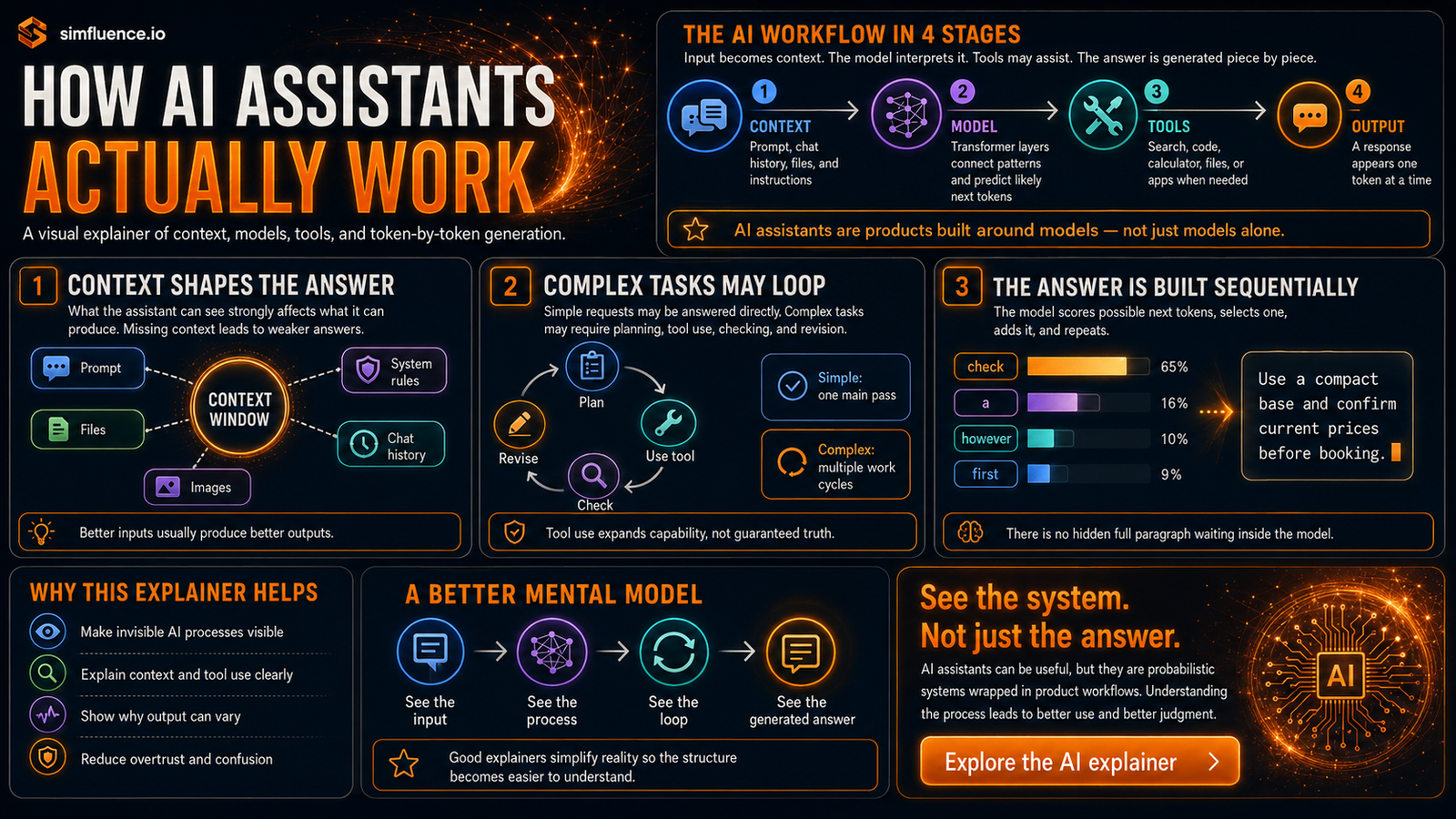
AI assistants are now everywhere. People use ChatGPT, Claude, Gemini, and similar tools to write, summarize, code, research, plan, compare, translate, analyze files, and make decisions faster. But most users still have only a vague idea of what happens between typing a request and seeing an answer appear on screen.
That gap matters.
If people imagine AI assistants as magical search engines, they overtrust them. If they imagine them as simple databases, they misunderstand why answers can vary. If they think the full answer already exists somewhere inside the model, they miss the most important point: an AI assistant builds a response step by step from context, learned patterns, product rules, and sometimes external tools.
That is why this interactive AI explainer exists.
It does not try to expose the exact private internals of ChatGPT, Claude, or Gemini. Those systems differ by model version, product design, context limits, memory behavior, safety rules, available tools, and interface choices. The point is simpler: to show the shared high-level process behind modern AI assistants in a way normal users can understand.
A language model is not the whole assistant
The first mistake is treating “AI assistant” and “language model” as the same thing.
A language model is the core prediction engine. It has learned patterns from large-scale training and stores those patterns in billions of learned weights. It does not work like a normal database where a finished paragraph sits waiting to be retrieved.
An AI assistant is the product built around that model. It includes the user interface, memory settings, safety layers, system instructions, tool access, file handling, orchestration, formatting, and other product-level features.
So when someone says “ChatGPT answered this” or “Claude did that,” they are usually talking about a whole assistant system, not only the model sitting underneath it.
This distinction is boring but important. It explains why different assistants can behave differently even when the underlying idea is similar. One product may have different tools. Another may have a larger context window. Another may apply different safety or formatting rules. Another may be faster, more cautious, more verbose, or better integrated with files and apps.
The model matters. But the assistant around the model matters too.
Context is what the assistant can currently “see”
When you ask an AI assistant something, it does not simply search its training data and return a stored answer. It works with the information available in the current interaction.
That information is the context.
The context can include your prompt, previous chat messages, uploaded files, images, system instructions, developer instructions, tool results, retrieved documents, and other available information. The assistant uses this working context to decide what your request means and what kind of response is likely to help.
This is why wording matters. It is also why missing context creates weak answers. If the assistant cannot see the relevant document, current data, exact constraint, or intended audience, it has to infer. Sometimes the inference is good. Sometimes it is wrong.
The simulation makes this visible through the context window. The context window is the assistant’s active working space. It is not infinite. It has limits. It also changes as the task continues, especially when tools are used and new information is added back into the conversation.
Tokens are the pieces the model works with
AI assistants do not process text exactly the way humans do. Your request is broken into smaller pieces called tokens. Tokens can be words, parts of words, punctuation, or other text fragments.
The model then works with those tokens mathematically. It turns them into internal representations, connects patterns across the context, and uses transformer layers to evaluate relationships between the pieces.
That sounds abstract because it is abstract. But the practical point is simple: the assistant does not “read” like a person and does not “know” like a person. It processes structured pieces of input through a learned statistical system.
This is one reason AI can be powerful and strange at the same time. It can connect clues across long text, generate fluent explanations, and adapt to style. But it can also produce confident wording without genuine understanding in the human sense.
The simulation does not require users to understand all the mathematics. It shows the process visually: input becomes tokens, tokens move through model layers, and the model builds a response from probabilities.
Simple tasks often need one main pass
Some AI tasks are relatively simple.
You ask for a rewrite. The assistant rewrites. You ask for a summary. The assistant summarizes. You ask for brainstorming. The assistant generates ideas. You ask for a short explanation. The assistant answers from the available context.
These tasks usually need one main model pass. The assistant reads the context, interprets the instruction, and starts producing the answer.
That does not mean the answer is automatically correct. A simple task can still be badly framed. A summary can omit something important. A rewrite can change the meaning. A brainstorm can sound better than it is.
But structurally, the process is more direct: request → model work → answer.
The explainer shows this because users often confuse simple AI interaction with complex AI work. They see text appear quickly and assume all tasks work the same way. They do not.
Complex tasks may require a work loop
Complex tasks are different.
If you ask an assistant to research a purchase, analyze a report, or plan a trip, one direct pass may not be enough. The assistant may need to plan, search, inspect files, calculate, compare, check assumptions, and revise the answer.
That creates a work loop.
A complex task can look like this:
The assistant loads the context. It identifies the goal. It decides whether the answer can be produced directly or whether a tool is needed. If a tool is needed, it uses the tool, receives the result, adds that result back into the context, and continues. It may repeat this several times before producing the final response.
This is where modern AI assistants become more than autocomplete. They can act as task coordinators. They can decide when to use search, when to read a file, when to calculate, when to compare sources, and when to ask for clarification.
But this also creates new failure points. The assistant may choose the wrong tool. It may search poorly. It may overread weak evidence. It may miss a constraint. It may summarize tool results too confidently. It may produce a polished answer that hides uncertainty.
That is why the simulation shows both the power and the limits of complex AI workflows.
Tool use does not make the assistant automatically correct
Tool use is one of the most useful parts of AI assistants. It lets the system go beyond the model’s built-in training. A tool might search the web, retrieve a file, run code, calculate something, call an app, query a database, or fetch structured information.
But tool use is not magic.
A tool can return incomplete data. A web search can surface weak sources. A file can be misread. A calculation can be based on the wrong assumption. A map result can be outdated. A retrieved document can be irrelevant. The assistant still has to interpret what came back.
This is why the explainer avoids a naive message like “AI tools make answers accurate.” They do not. They make more kinds of work possible. Accuracy still depends on context, source quality, tool design, reasoning steps, verification, and user judgment.
The better message is this: tools extend what the assistant can do, but they also create a workflow that needs checking.
The answer is generated one piece at a time
The most important part of the simulation is the final generation loop.
The visible answer appears piece by piece. Behind that, the model repeatedly scores possible next tokens, selects one, adds it to the growing response, and continues. The assistant may stream those pieces to the screen as they are produced.
This is why the answer can feel like it is being written in real time. It is.
There was no complete paragraph hidden inside the model waiting to be copied out. The model generates the response sequentially. It uses the current context, the previous tokens already generated, and its learned patterns to estimate what should come next.
A useful metaphor is very powerful autocomplete. But the metaphor has limits. It is not the autocomplete on your phone. It is a massive model using complex internal representations and a large context. Still, the basic idea helps: the system repeatedly predicts and extends the response.
This also explains why the same prompt can produce different wording. AI generation is probabilistic. Settings, model behavior, context, and product rules influence which likely token is chosen next.
Product checks wrap around model generation
Users usually see only the final answer. They do not see the surrounding product system.
Modern AI assistants may apply formatting, safety checks, tool-result handling, citation rules, memory behavior, interface decisions, and other finishing steps around the model output. These checks can improve the user experience, but they are not proof that every factual claim is correct.
That distinction matters.
A well-formatted answer can still be wrong. A confident answer can still be incomplete. A cited answer can still misinterpret the source. A safe answer can still be shallow. A fast answer can still skip important nuance.
The explainer shows product-level finishing checks because users need to understand that the visible answer is the end of a process, not a guarantee of truth.
Why this needs to be visual
Most explanations of AI assistants are either too technical or too vague.
A highly technical explanation talks about embeddings, attention, transformer layers, tool calls, context management, and probabilistic generation. That is useful for developers, but it loses normal users quickly.
A vague explanation says “AI predicts words” or “AI uses patterns.” That is true, but too thin. It does not explain why assistants can use tools, why complex tasks loop, why current context matters, or why polished answers can still need checking.
A visual simulation solves this communication problem.
It lets people follow the process without needing to understand the full mathematics. They can see the request enter the context window. They can see tokens and model layers. They can see the assistant choose between answering directly and using a tool. They can see complex work loops. They can see the final answer being assembled one token at a time.
That is the value of the interactive AI explainer: it turns an invisible process into something users can reason about.
What users should learn
The main lesson is not that AI assistants are fake, magical, dangerous, or all-knowing. The main lesson is that they are systems.
They combine learned model behavior, current context, product design, tool access, and generation settings. They can be extremely useful, especially when the user understands what kind of task they are giving them. But they are not neutral truth machines.
For simple tasks, the assistant may answer directly. For complex tasks, it may need to plan, use tools, check results, and revise. For factual tasks, current evidence matters. For high-stakes tasks, verification matters. For creative tasks, variation is normal. For file and research tasks, source quality matters.
Once users understand that structure, they become better users of AI. They write clearer prompts. They provide better context. They know when to ask for sources. They know when to verify. They understand why the same assistant can be brilliant in one task and weak in another.
The point of the simulation
This simulation is not a live trace of ChatGPT, Claude, or Gemini. It does not claim that these products have identical internals. It deliberately simplifies the process.
But the simplification is useful.
It gives users a mental model: AI assistants do not simply “know and answer.” They receive context, process tokens, route the task, sometimes use tools, loop through intermediate work, and generate the final response piece by piece.
That mental model is enough to reduce both overtrust and undertrust.
Overtrust happens when users treat AI answers as finished truth. Undertrust happens when users dismiss AI as random text generation with no useful structure. Both views are too crude.
The better view is more practical: AI assistants are powerful probabilistic systems wrapped in product workflows. They can help with real tasks, but their outputs need to be understood as generated, contextual, and checkable.
That is what the interactive AI explainer is designed to show.
Interactive AI Explainer: How AI Assistants Actually Work